.svg)
How to Consolidate Multiple QuickBooks Companies (Every Method, Honestly Compared)
If you manage the books for a client who owns three companies, you already know the punchline: QuickBooks Online treats each company as its own sealed universe. Separate subscription, separate login, separate chart of accounts, and absolutely no button that says "show me all of this together."
We run a bookkeeping firm. We've consolidated financials every way it can be done, including some ways we're not proud of. This is the guide we wish someone had handed us: every method, what it actually costs, and where each one breaks.
One disclosure up front: after years of doing this the hard way, we built our own software to fix it (Switchbooks). We'll cover it below alongside everything else, and we'll tell you honestly when the other options are the better fit. Fair? Fair.
Why QuickBooks can't do this natively
QuickBooks Online is built around a one-company file. Multi-company owners buy one subscription per entity, and the entities never speak to each other. QBO Advanced adds Spreadsheet Sync, which can pull data from several files into Excel, but at that point you are paying Advanced prices to maintain a spreadsheet, which is the thing you were trying to escape. Intuit's enterprise-tier suite does offer multi-entity features, at pricing designed for companies with a finance department, not for a firm managing a client with an LLC per rental property.
So the market has produced workarounds. There are three real approaches.
Method 1: The spreadsheet (the method most firms actually use)
The ritual, for anyone lucky enough to have never done it: export each entity's P&L and balance sheet, paste each one into a master workbook, map the accounts that don't line up ("Auto Expense" in one file, "Vehicle" in another), knock out intercompany transfers by hand, and pray nobody added an account since last month. Repeat every single month.
The honest pros: it's free, it's infinitely flexible, and for two entities with a clean, identical chart of accounts, it's genuinely fine. We did it this way for years.
The honest cons: it doesn't scale and it doesn't forgive. Every entity you add multiplies the mapping work. Every formula is one broken paste away from a wrong number in front of a client. And the deliverable is frozen: when the client asks "what's in that $40k of professional fees?", the spreadsheet has no answer. You go back into each QBO file and dig.
What it really costs: count the hours. A three-entity monthly consolidation reliably eats two to five hours of skilled work, every month, forever. At firm billing rates, your "free" spreadsheet costs more per year than any software on this page.
https://app.switchbooks.ai/share/reports/QfRFFLY-HFJRSHJ7jZ-l5aqNsUht0_B5DW811CVNtD0
Method 2: Reporting tools on top of QuickBooks (LiveFlow, Fathom, Qvinci, Reach)
These tools sync data out of each QuickBooks file into a dashboard or a live spreadsheet, and they'll assemble a consolidated report from the synced copies. They're real products that solve real problems, and if your firm lives in dashboards, some of them are lovely.
But it's worth being precise about what they are: a reporting layer on top of the problem, not a fix for it. Three structural things follow from that.
You're now paying for everything. Every QBO subscription stays, and the tool's fee (often priced per company) goes on top. Consolidation becomes the most expensive feature in your stack.
The sync is a point of failure. Your consolidated report is a copy of a copy. When a sync silently stalls or a re-mapped account doesn't flow through, you find out at the worst moment, which is when a client questions a number.
It's read-only. This is the big one. When something in the consolidated report looks wrong, and something always looks wrong, you can't click the number, find the transaction, and fix it. The books still live in separate QBO files. The tool shows you the problem; the fixing happens somewhere else, times however many entities you have.
Best for: firms committed to QBO long-term who mainly need pretty multi-entity dashboards for client meetings, and who are fine keeping the actual bookkeeping fragmented.
Method 3: Accounting software that's multi-entity natively
The third approach dissolves the problem instead of managing it: keep every entity in one accounting system to begin with. Then "consolidation" stops being a monthly project or a synced report. It's just a view.
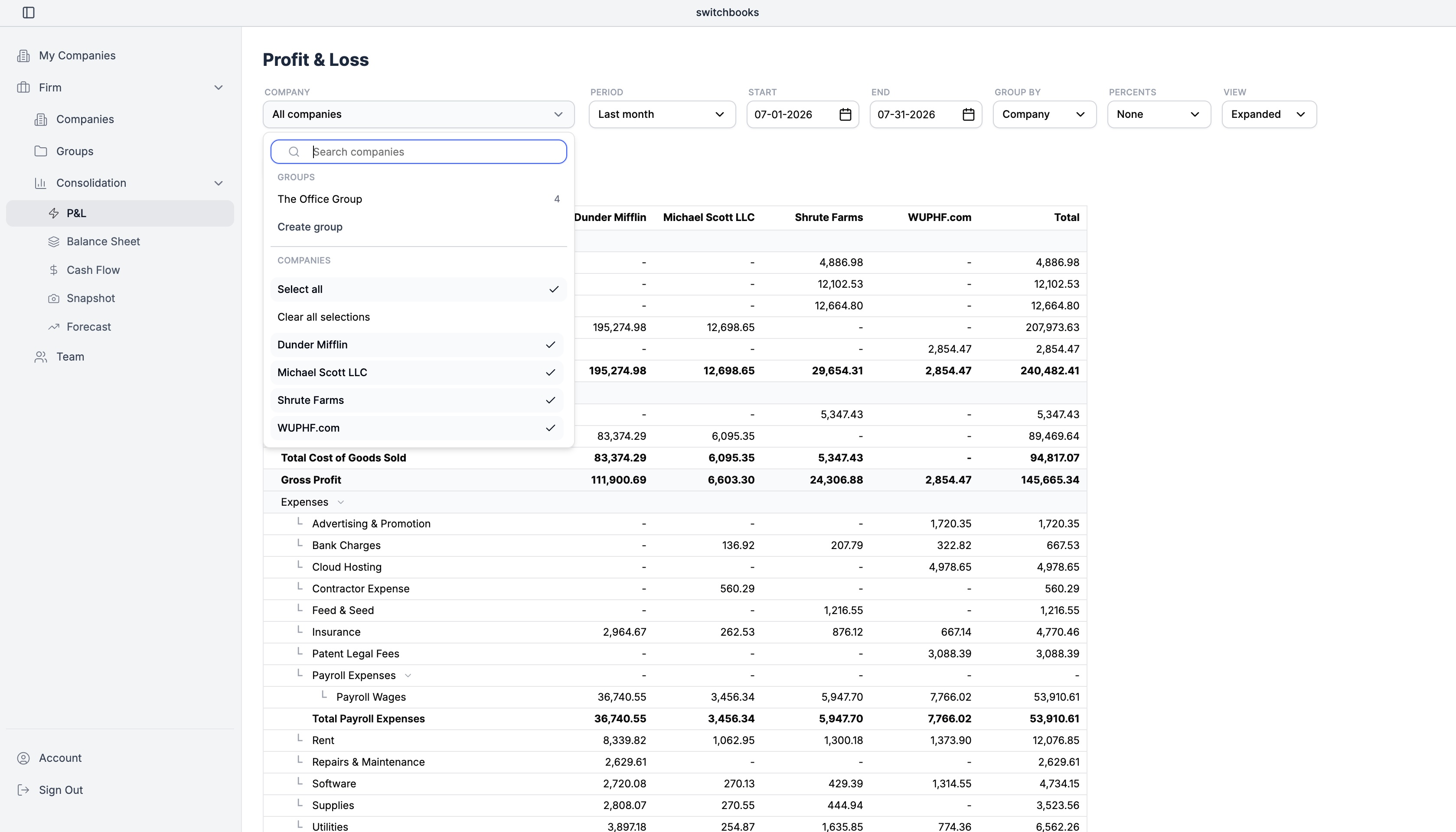
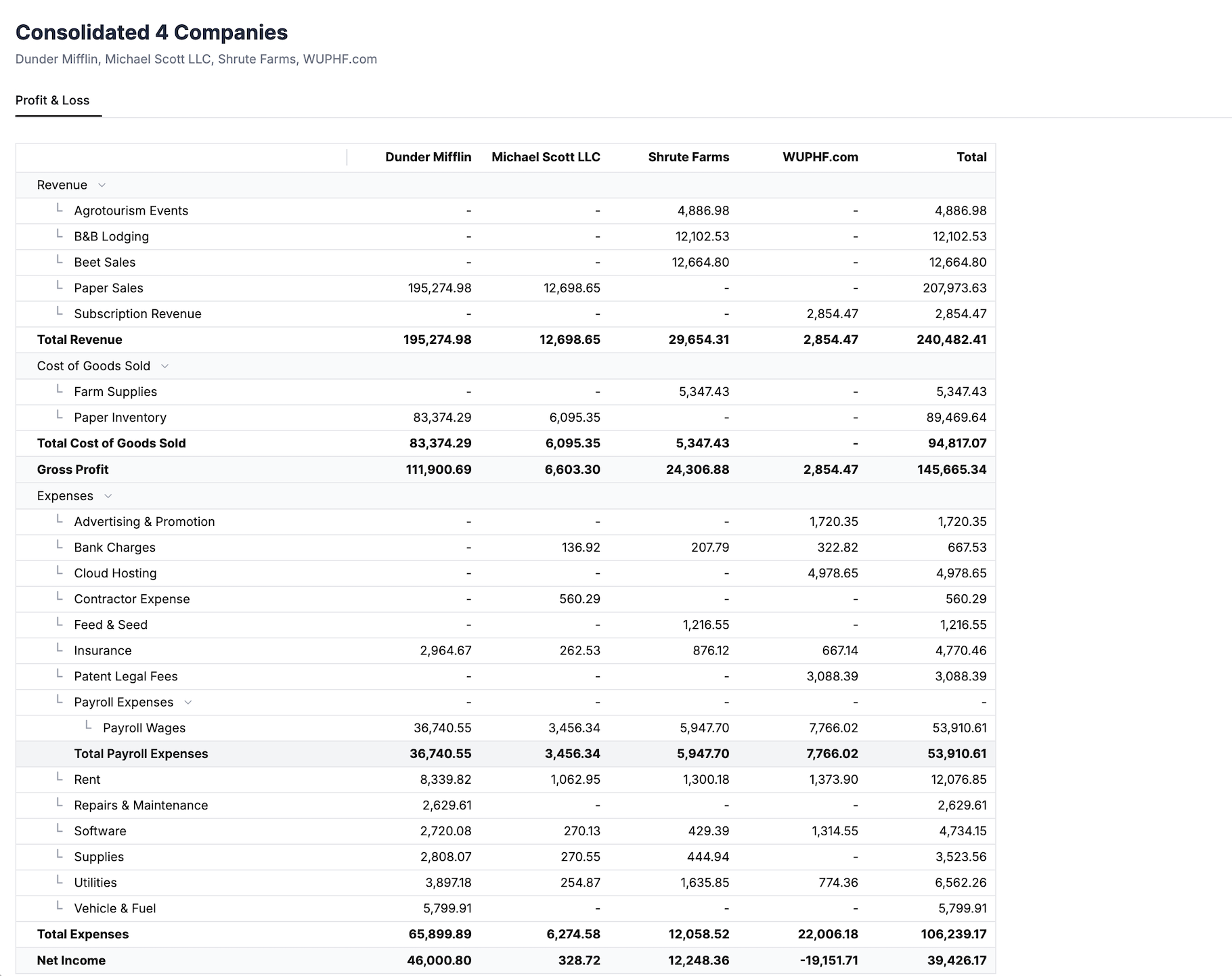
This is what we built Switchbooks to do, because we got tired of methods 1 and 2. All of a client's entities live under one login. You run each company's books normally, and when you want the whole picture, you select the entities and get a consolidated P&L or balance sheet in one click, with each entity in its own column next to the total.
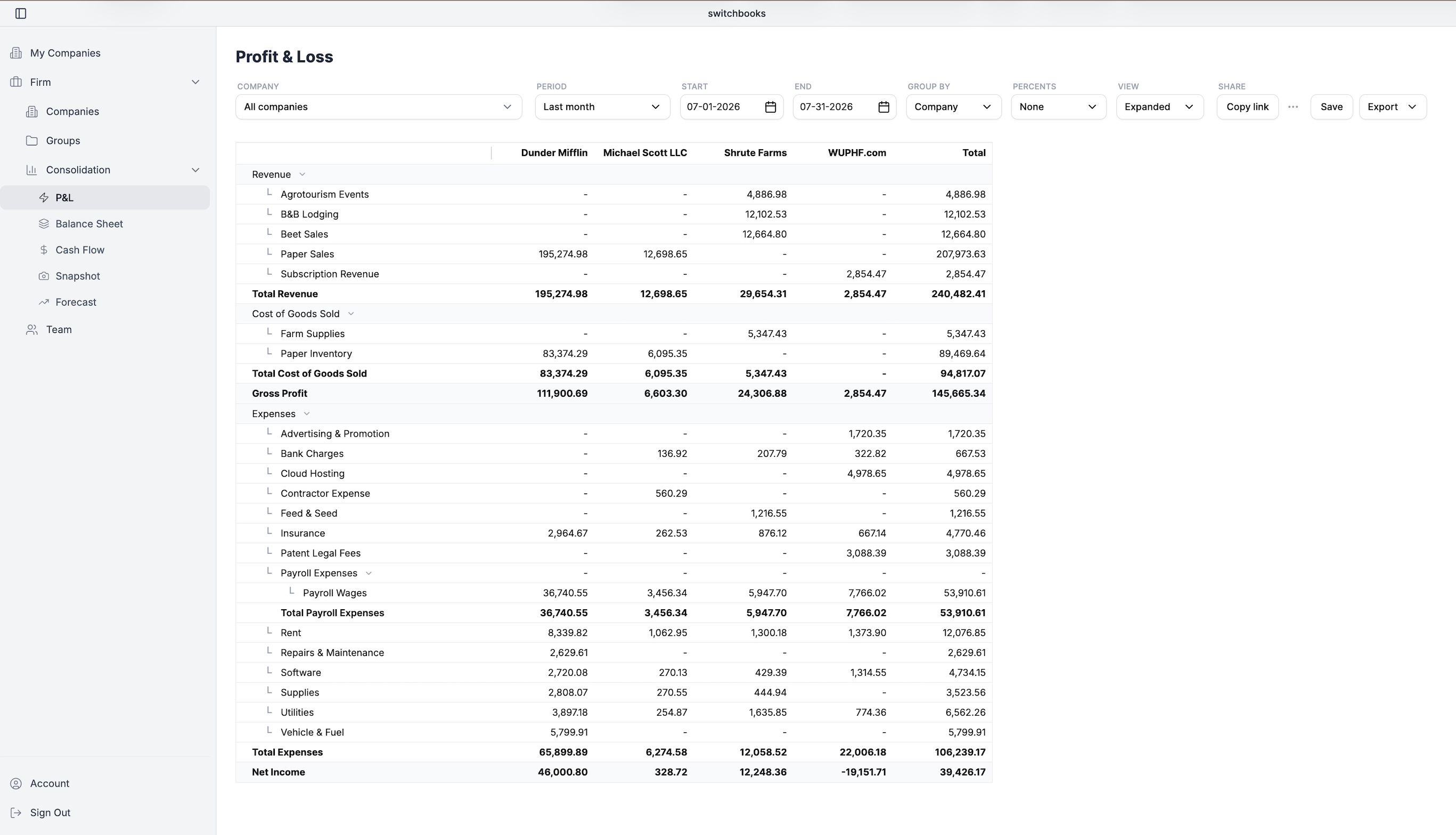
The part that matters most in daily work is that the consolidated view is connected to the ledger underneath. Click any consolidated number and you're looking at the underlying transactions across entities. Spot a miscoded expense, fix it, and the consolidated report is simply correct, because there's no export, no sync, and no copy. There's nothing to go stale.
The honest cons, since everyone else got theirs: it means moving the books off QuickBooks, and a migration is real work no matter what any vendor tells you. If an entity has deep QBO-ecosystem dependencies (niche app integrations, payroll wiring you don't want to touch), that entity may not be a good candidate to move first. Most firms that switch start with one multi-entity client, usually the one whose consolidation spreadsheet they hate most, and go from there.
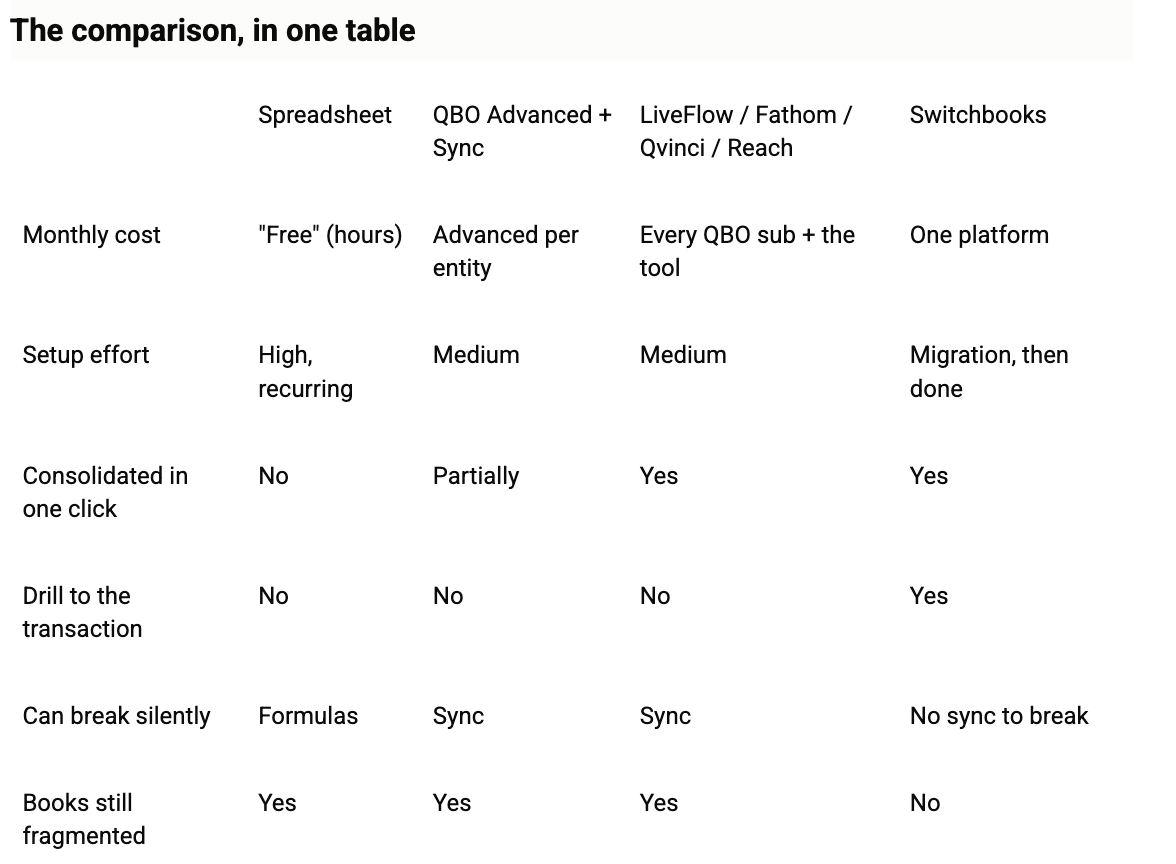
So which should you choose?
Our honest advice, the same we'd give a fellow firm over coffee:
- Two entities, clean books, quarterly reporting? Keep the spreadsheet. It's fine. Don't let anyone sell you anything.
- Married to QBO and mainly need dashboards? A reporting layer like LiveFlow or Fathom will make your client meetings prettier, and that has value.
- Consolidating three or more entities monthly, and tired of paying per entity for the privilege? That's the situation we were in, and it's the situation we built for. That's the client to try on a native multi-entity system.
If you'd like to see the one-click version with your own eyes, we're happy to show you. And if you just came for the spreadsheet validation: yes, the ritual is as bad as you think, and no, you're not doing it wrong. The software was.
FAQ
Can QuickBooks Online consolidate multiple companies? Not natively. Each company is a separate subscription with separate reports. QBO Advanced's Spreadsheet Sync can pull multiple files into Excel, and Intuit's enterprise suite offers multi-entity features at enterprise pricing, but standard QBO has no consolidated reporting.
Can I merge two QuickBooks files into one? Not really. There's no supported merge; combining entities means migrating data manually or via third-party services. Most people asking this actually want consolidated reporting across entities, which is what this guide covers.
How do bookkeeping firms usually consolidate client financials? Most commonly in Excel or Google Sheets, exporting each entity monthly and combining by hand. Larger firms sometimes layer a reporting tool on top of QuickBooks. A growing number use accounting platforms where multiple entities live under one login and consolidation is built in.
What about intercompany eliminations? Every method on this page still requires judgment there. Whichever tool you use, review intercompany transfers before presenting consolidated statements. The difference is whether you're reviewing them in one system or across five.
How long does moving off QuickBooks take? For a typical small entity, expect days rather than months, with historical data imported so year-over-year reporting survives. Plan the first migration on your simplest entity, not your gnarliest.
.png)